OpenVibe is a desktop app that puts AI coding agents on an infinite canvas. Each agent runs in a real terminal: Claude Code, Codex, Gemini CLI and more. You group agents into teams, brief a whole team in one line, review their changes, and hand a large task to an orchestrator that splits it, staffs it and keeps time.
OpenVibe is open source, under the MIT licence. It is an early preview, built with Tauri 2 and tested on Windows 10 and 11. Everything runs on your machine, and the interface speaks English and French.
If you know Symvibe, OpenVibe covers the same ground (driving a fleet of CLI agents from an infinite canvas) as an independent, open-source project with its own design and features.
How a mission runs
Your goalone instruction
Orchestratorplans, splits, budgets
Model routerlevel picks the model
Haiku 5.5low
Sonnet 5.5medium
Opus 5.5high
Fable 5.1extreme
Agentsown terminal, worktree, branch
Reportsstatus · summary · budget
Mission branchmerged
Never pushesyou review and push
- Goal. You link an orchestrator, a Claude Code session that acts as a team manager, to a group and describe the goal in its terminal.
- Plan. It proposes a plan: sub-tasks, each with an owner, a time budget and, optionally, a difficulty level.
- Split. You launch the mission. OpenVibe creates the mission branch
openvibe/<mission>, plus a branch and a worktree for each agent next to your repository, and gives every agent its sub-task. - Route. With the model router on, each sub-task's level picks the model its agent runs on: low → Claude Haiku 5.5, medium → Claude Sonnet 5.5, high → Claude Opus 5.5, extreme → Claude Fable 5.1.
- Run. Each agent works in its own terminal, on its own branch and worktree, and its live state shows on the canvas. Each Claude agent declares its steps, which appear as a timeline under its terminal.
- Report. The agents report back when done. The orchestrator is told when a sub-task reaches its budget; at twice the budget you get a notification. Nobody is stopped automatically.
- Merge. The orchestrator merges the finished branches into the mission branch; a conflict aborts that merge and is reported. OpenVibe never pushes and never merges into your own branch: you do.
The orchestrator talks to OpenVibe through a local MCP server, with tools such as propose_plan, team, read_output, extend, reassign, merge and remote_control. It can read the repository but is denied Edit, Write and NotebookEdit: the agents write the code. When a sub-task runs over its budget, the orchestrator can extend it, interrupt it or reassign it.
Features
- Real terminals on a canvas. Every agent is a real PTY (ConPTY on Windows) drawn with xterm.js. The canvas is Excalidraw: pan, zoom, and draw shapes, arrows, text and images around the agents.
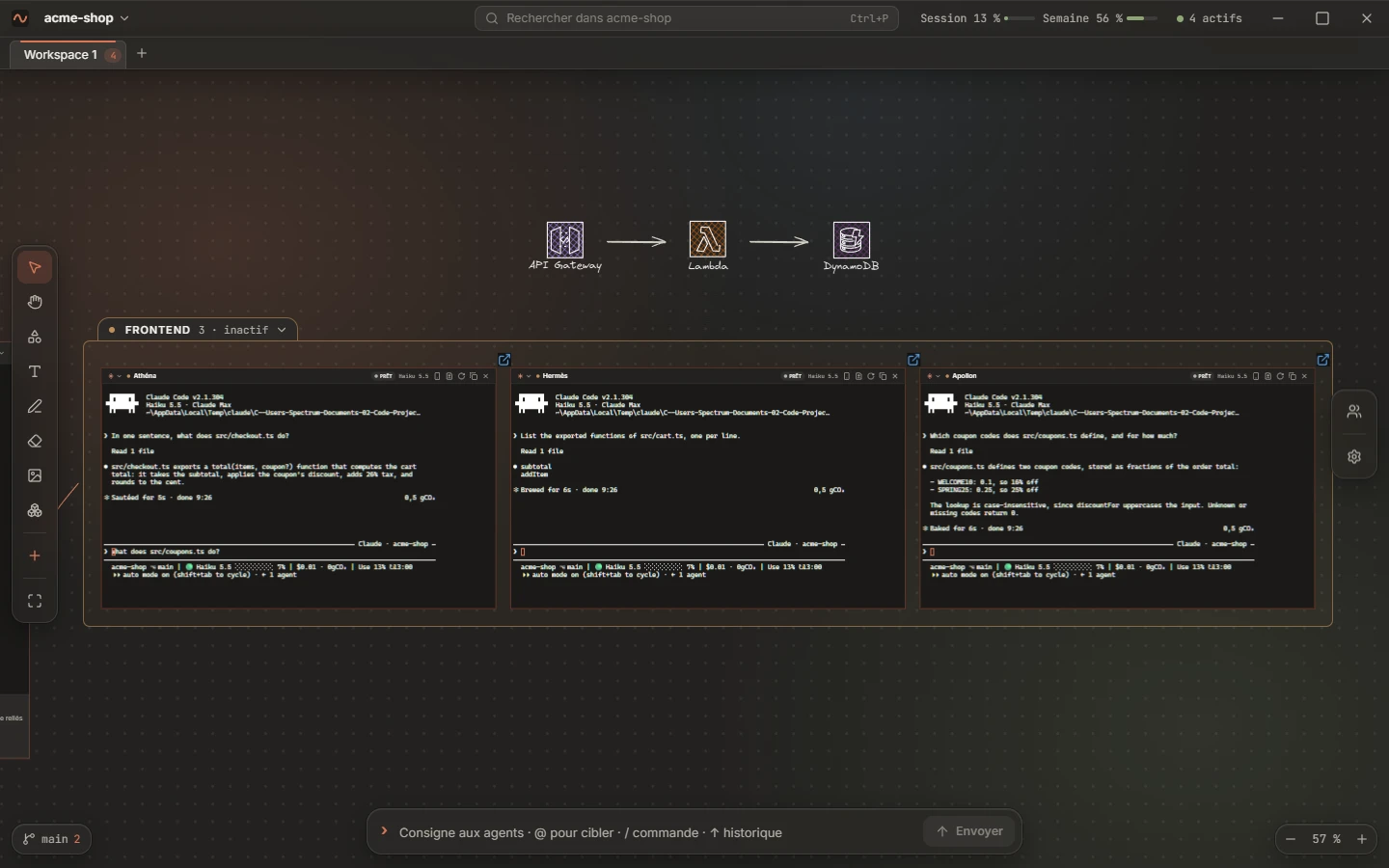
- Teams. Launch four agents at once, or compose a group with a role (Frontend, Backend, Testers, Reviewers). Each group takes its names from a pantheon: Athéna, Hermès, Apollon.
- Live states. Each agent shows whether it is starting, ready, running, waiting for you, stopped or done, on the canvas and in the Agents panel.
- One instruction box for everyone. Address everyone, a group, an agent or several at once. The history keeps your last 50 instructions per project.
@frontend, three agents answer at once.- Commands too. A line starting with
/goes to the agents' CLI as a command.
/context runs in each session of the group.- An orchestrator that manages. Give it a goal: it proposes a plan, gives each agent a sub-task on its own branch and worktree, watches the time budget and merges the results into a mission branch. With the model router on, each sub-task's level picks its agent's model: Haiku 5.5, Sonnet 5.5, Opus 5.5, Fable 5.1.
- Change review. See what an agent changed, uncommitted or since its base, browse the repository read-only, and click a line to leave a remark. All remarks go back to the agent in one message.
- Remote Control. Turn on Claude Code's Remote Control for one agent, a group or the whole team, and follow them from your phone.
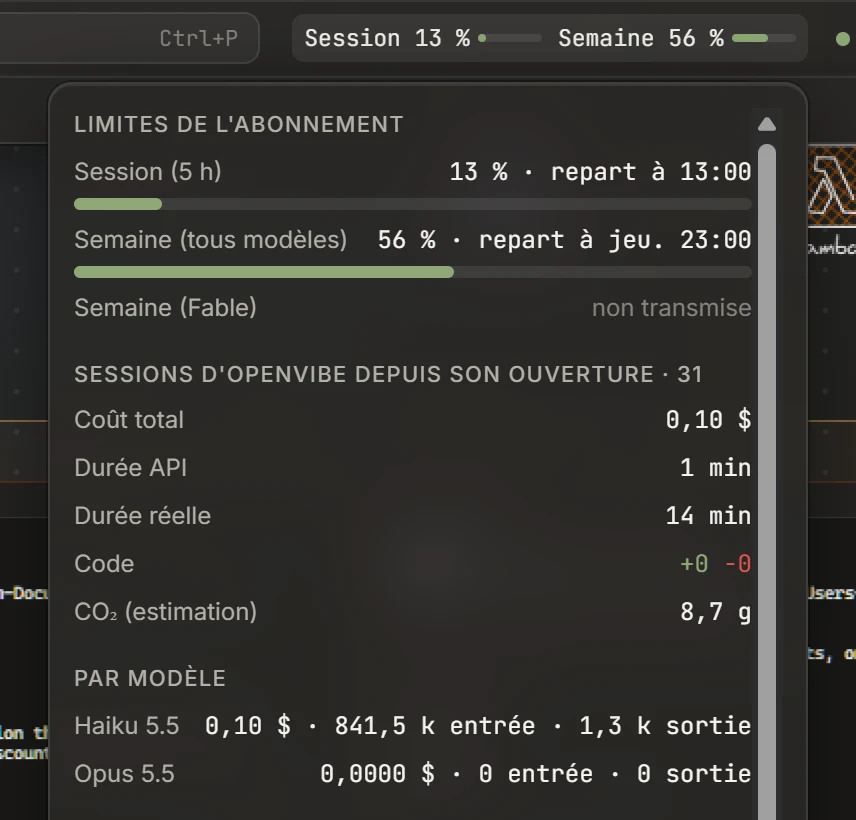
- Usage at a glance. The title bar shows your Claude subscription's session and weekly limits, with cost, durations, tokens per model, prompt cache state and an estimate of CO₂ one click away.
- Icon libraries. About 600 icons from the Excalidraw community (system design, AWS, Azure, GCP), bundled with the app, for sketching an architecture next to the agents that build it.
- Projects and workspaces. One project per folder, several workspace tabs per project. Everything is saved locally, and after a restart OpenVibe offers to resume your Claude conversations.
- Keyboard first. Palettes, jumps between terminals and a radial menu on a right-press. Light and dark themes follow Windows.
Supported agents
OpenVibe launches the agents you already have: an agent counts as available when its command is on your PATH.
hooksClaude Code reports its state through hooks: running, waiting for you, done. Other agents: read from their output.
| Agent | Command | State detection |
|---|---|---|
| Claude Code | claude |
Hooks: running, waiting for you, done |
| Codex | codex |
Output, plus its notify hook at the end of each turn |
| Gemini CLI | gemini |
Output |
| Qwen Code | qwen |
Output |
| Cursor | cursor-agent |
Output |
| OpenCode | opencode |
Output |
| Aider | aider |
Output |
| Ollama | ollama run <model>, or Aider on an Ollama model |
Output |
| Shell | PowerShell, cmd, pwsh or Git Bash | Output |
| Custom | any command you type | Output |
Remote Control, missions, the model router, the step timeline and the usage meter need Claude Code. The canvas, groups, mentions and review work with every agent.
Install
Download OpenVibe_<version> from the latest release and run it on Windows 10 or 11. It installs for your user only and needs no administrator rights.
Betas are not code-signed yet. If Windows SmartScreen stops the installer, choose More info, then Run anyway.
You also need:
- at least one agent CLI, for example Claude Code;
- Git, from git-scm.com: Git Bash provides the
bashthat the usage meter needs.
On first launch, the home screen walks you through installing an agent, adding a project and launching an agent.
Build from source
You need, on Windows 10 or 11:
- Tauri 2's Windows prerequisites: the Microsoft C++ Build Tools and WebView2, which Windows 11 already has;
- Rust 1.85 or newer;
- Node.js 22 LTS and pnpm 10;
- Git and at least one agent CLI, as above.
git clone https://github.com/Mideky-hub/openvibe.git
cd openvibe
pnpm install
pnpm tauri dev      # run in development
pnpm tauri build    # build the installer
The installer is written to src-tauri/. It also installs per user, with no administrator rights.
Architecture
- Desktop shell: Tauri 2. The Rust side owns the PTYs (portable-pty), git, the SQLite database and a small HTTP server.
- Interface: React 19, TypeScript, Zustand and Tailwind CSS 4, with Excalidraw for the canvas and xterm.js for the terminals.
- Agent states and tools: the HTTP server listens on
127.0.0.1only, on a random port, and every request needs a token drawn when the app starts, or the session's own token. Each Claude Code session gets an extra--settingsfile that declares hooks reporting its state, a status line reporting usage, and the MCP server for the mission tools. OpenVibe reads your own~/.claude/settings.jsonbut never modifies it. - Storage: projects, canvases, terminal scrollback and settings live in a local SQLite database under
%APPDATA%\.dev.openvibe.app\
The security model is in the repository.
Privacy
Everything runs on your machine. OpenVibe adds no cloud service and no telemetry, and it never skips an agent's permission prompts.
Its only request of its own is the update check: it looks for a new release on GitHub 10 seconds after it starts, then every 6 hours, and offers to install it. Updates are signed, and one whose signature does not match is refused. To turn the check off, untick it in the settings menu (the gear).
Licence
OpenVibe is open source, released under the MIT License. It builds on Tauri, Excalidraw, xterm.js, portable-pty and cmdk; the bundled icon libraries come from the Excalidraw community, under the MIT License.
OpenVibe is an independent project. It is not affiliated with Symvibe, Anthropic, OpenAI, Google or the makers of the other agents it launches; their names belong to their owners.